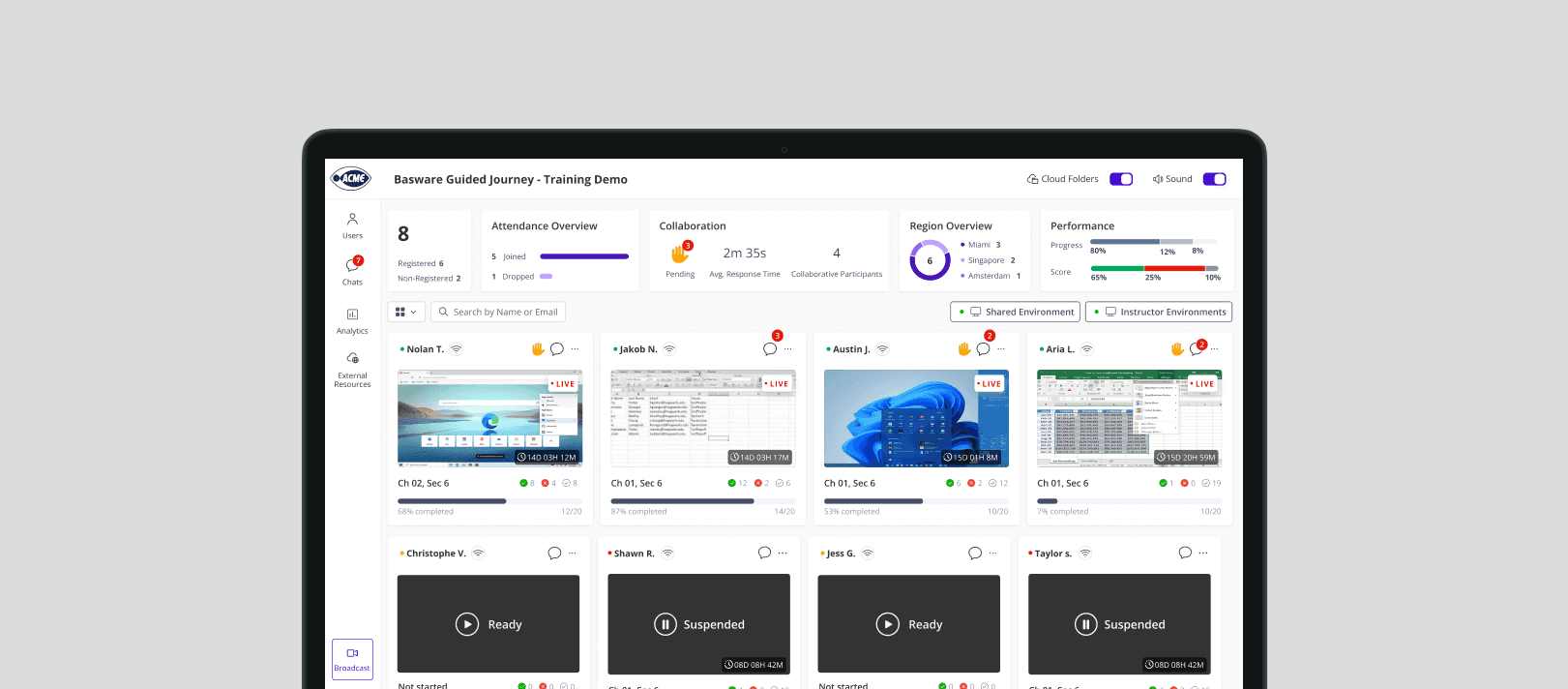
A unified console for monitoring progress, responding to help requests, and maintaining classroom flow.
Role: Product Designer · Scope: Research · UX Architecture · Interaction Design · Accessibility (WCAG 2.2) · System Alignment · Tools: Figma · Prototyping · User Interviews · Competitive Research · Design Tokens
Context
CloudShare provides virtual lab environments for enterprise training, where each participant runs an independent virtual machine during live sessions. Instructors must monitor progress, respond to assist requests, and resolve technical issues in real time, without losing classroom flow. Over time, the console became fragmented and cognitively demanding. This redesign transformed it into a structured real-time control system built for speed, clarity, and accessibility.
Key challenges
Live complexity Live sessions involve managing 20–50 concurrent VMs.
Class vs. individual visibility Instructors require macro visibility and instant drill-down.
Urgent interruptions Assist workflows must not disrupt instructional flow.
Accessibility overhaul The system required full WCAG 2.2 alignment.
Research & Strategic Insights
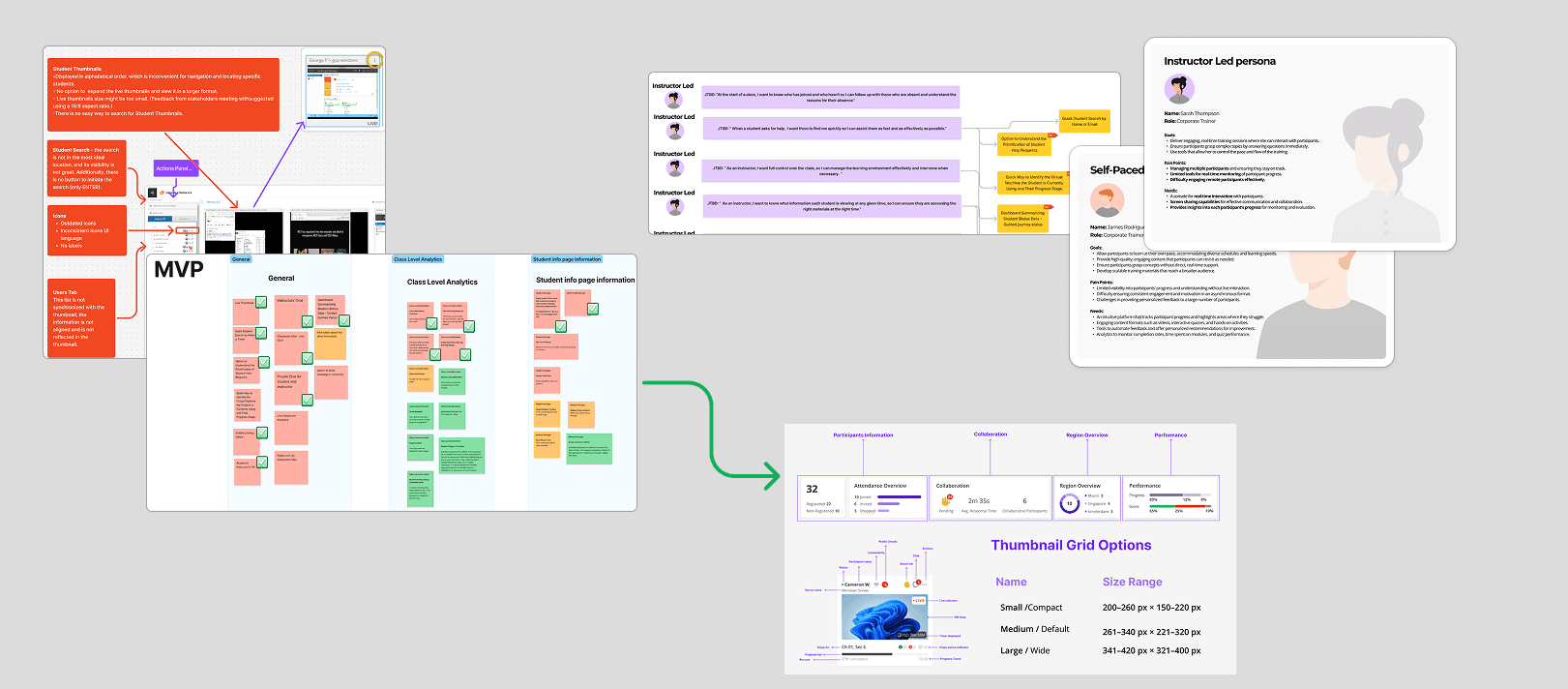
We conducted instructor interviews, shadowed live enterprise training sessions, and analyzed real assist workflows in real time. It quickly became clear that the console was not just a monitoring interface, it functioned as a real-time control layer in high-pressure environments. Instructors constantly switch between macro awareness (class-level status) and micro intervention (individual student troubleshooting), often within seconds.
Every delay, unclear signal, or fragmented interaction directly impacts teaching flow, response time, and classroom confidence.
What we learned
Instructors need immediate class-level awareness before taking action.
Assist signals must be visible and actionable instantly, every extra step disrupts instructional flow.
Fragmented controls increase context switching and cognitive load during live sessions.
Effective instruction requires simultaneous macro and micro visibility, understanding the full classroom while drilling into a single student without losing context.
Clarity, hierarchy, and accessibility directly impact reaction speed and instructor confidence.
Design approach
Dual-Level Visibility
Restructured the console to support seamless transition between full class awareness and focused student-level control.
Frictionless Intervention
Consolidated monitoring, communication, and VM access into a unified control layer to reduce context switching during live sessions.
Clarity Under Pressure
Redefined hierarchy and interaction patterns to support faster decision, making in high pressure environments.
System-Wide Accessibility Alignment
Implemented a WCAG 2.2, aligned visual and state system across the console to ensure clarity, consistency, and operational speed.
Key areas
Three structural shifts that transformed the Instructor Console into a real-time control system.
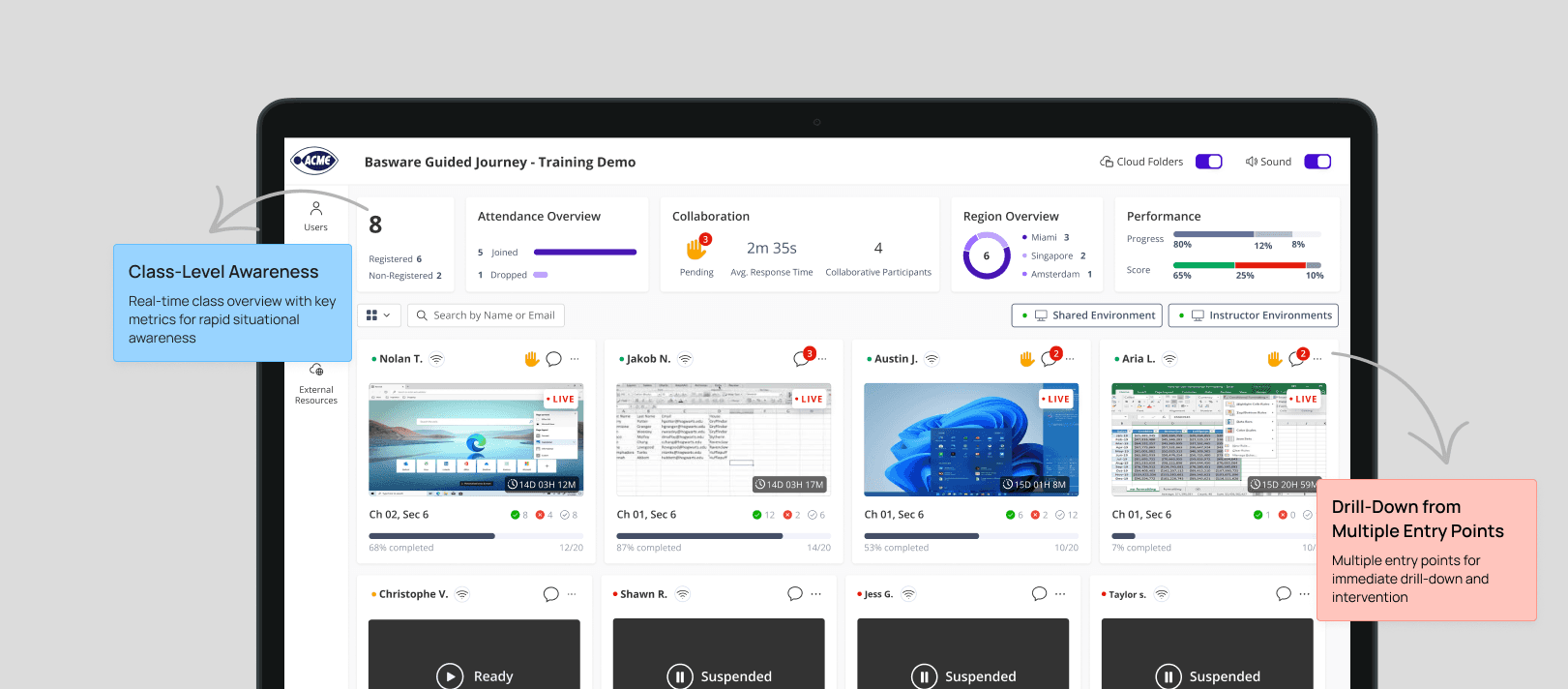
Class-Level Awareness & Drill-Down Control
The Problem
Switching between class overview and individual VM investigation introduced cognitive delay during live instruction.
The Solution
We redesigned the class view to support seamless drill-down into a specific student while preserving full class awareness, reducing context switching without fragmenting the experience.
Urgent Signals & Assist Requests
The Problem
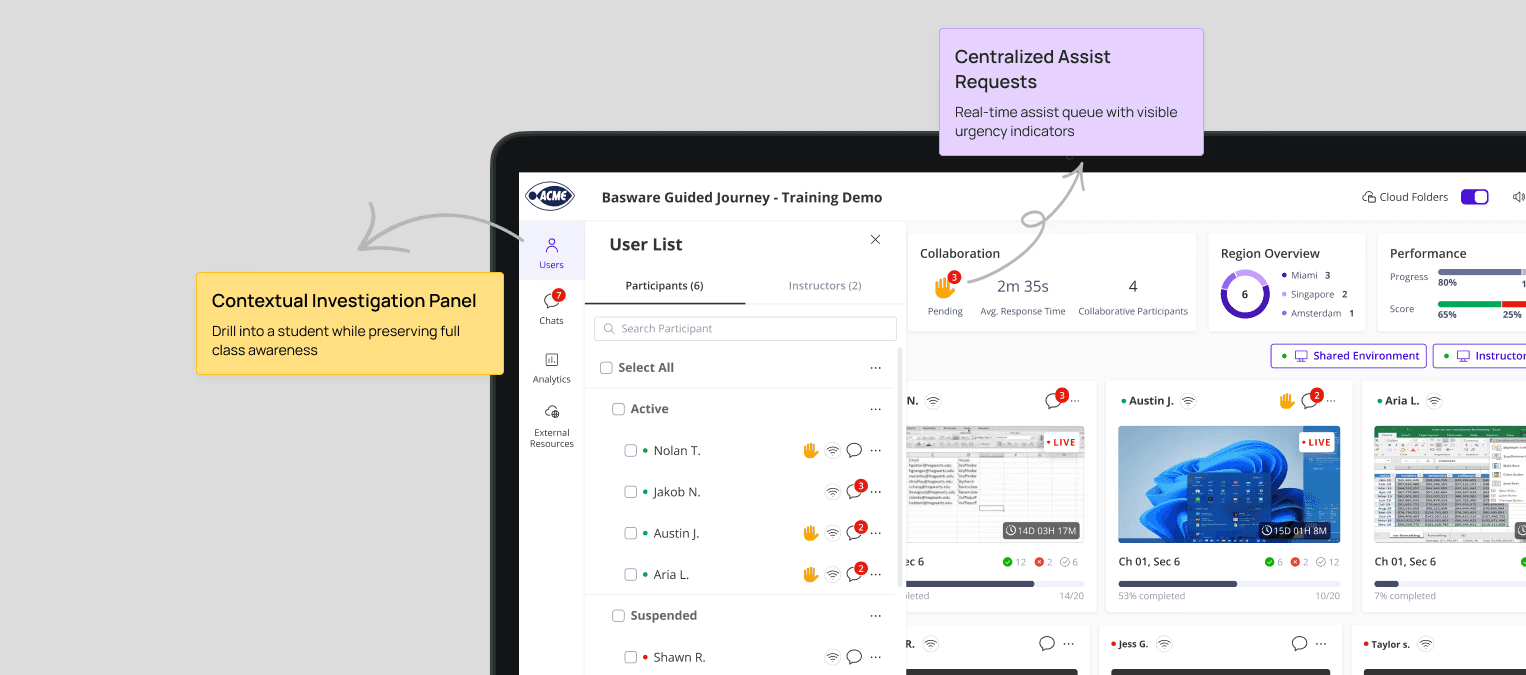
Assist requests, chat messages, and engagement indicators were easy to miss during live sessions.
Instructors needed a faster way to detect urgency and immediately take action, without breaking their teaching flow.
The Solution
We integrated real-time signals directly into the class view and enabled instant drill-down through a contextual side panel, allowing instructors to investigate and respond without leaving the classroom overview.
Guided Journey Progress Awareness
The Problem
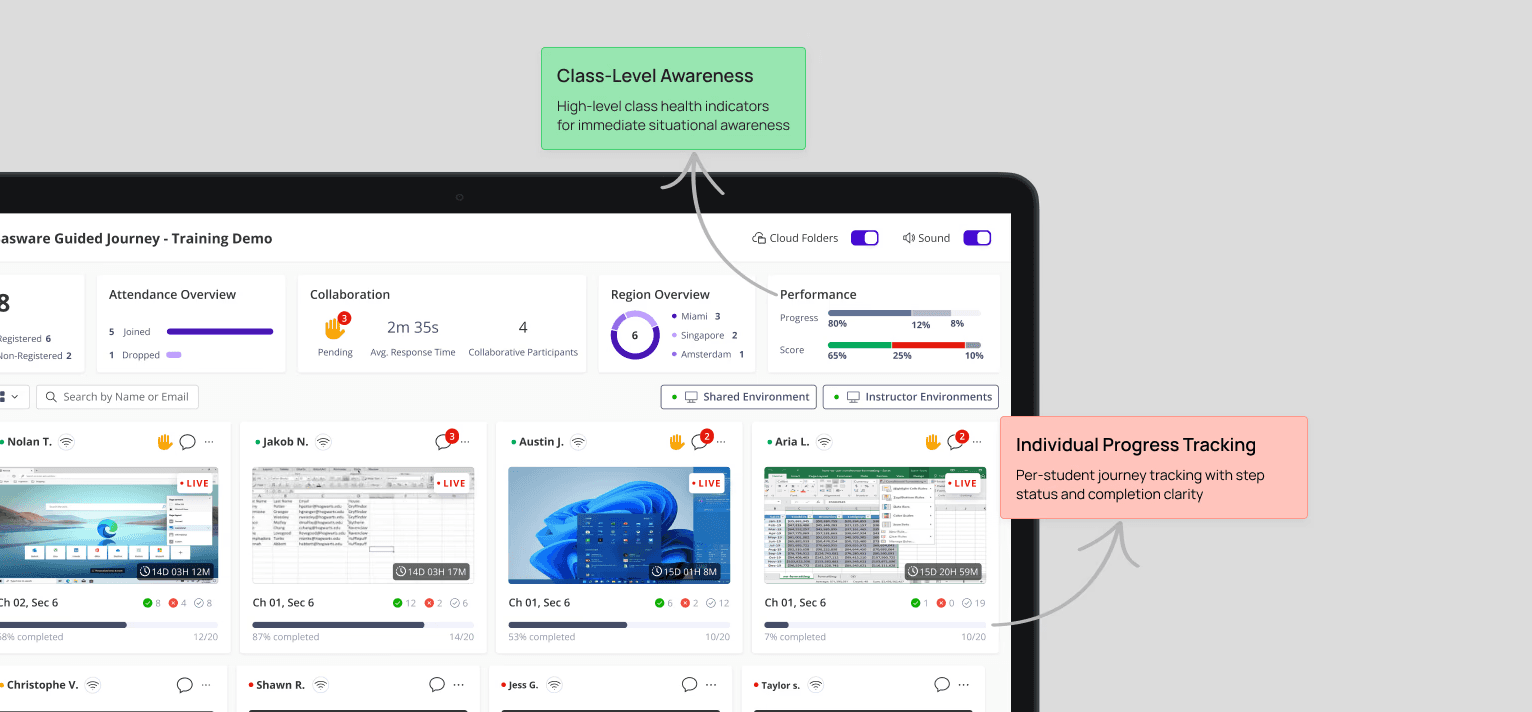
Instructors lacked visibility into where the class stood collectively and which students were falling behind, without drilling into each student individually.
The Solution
We designed a dual-layer visibility system, combining class level progress metrics with individual student journey indicators, enabling fast diagnosis at both macro and micro levels.
Key decisions
Designed for dual visibility. Balanced macro class metrics with per-student journey indicators to support fast instructional decisions.s.
Prioritized urgency through hierarchy. Assist signals, engagement alerts, and progress gaps were surfaced using visual weight and contextual placement.
Reduced context switching. Enabled monitoring, intervention, and VM access directly from the class overview without breaking flow.
Impact
Clarity under pressure. Instructors gained immediate visibility into class health and individual progress, without cognitive overload.
Faster intervention. Help requests, engagement gaps, and blocked students became visible in real time, enabling quicker instructional decisions.
Improved instructional flow. Reduced context switching allowed instructors to stay focused on teaching rather than navigating tools.
System-Wide Consistency & Accessibility. Accessibility and interaction patterns were unified across the product, strengthening usability and long-term scalability.
The console evolved from a passive monitoring tool into an operational control layer, enabling instructors to teach, intervene, and adapt in real time.
More projects